



17. XHTML MP Tables
To create a table in XHTML MP, you need the <table>, <tr> and <td> tags. Data in a cell is enclosed in <td></td> tags. Cells in the same row are enclosed in <tr></tr> tags. All rows are enclosed in <table></table> tags. So, <td></td> should be enclosed in <tr></tr> and <tr></tr> should be enclosed in <table></table>. The following XHTML MP example demonstrates how to create tables:
<?xml
version="1.0"?>
<!DOCTYPE html PUBLIC
"-//WAPFORUM//DTD XHTML Mobile 1.0//EN"
"http://www.wapforum.org/DTD/xhtml-mobile10.dtd">
<html
xmlns="http://www.w3.org/1999/xhtml">
<head>
<title>Table
in XHTML
MP</title>
</head>
<body>
<table>
<tr>
<td>Cell
A</td>
<td>Cell B</td>
<td>Cell
C</td>
</tr>
<tr>
<td>Cell
D</td>
<td>Cell E</td>
<td
rowspan="2">Cell
F</td>
</tr>
<tr>
<td
colspan="2">Cell
G</td>
</tr>
</table>
</body>
</html>
The result of the above XHTML MP markup code in mobile phone emulators is shown below:
|
|
|
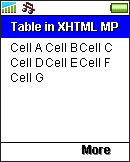
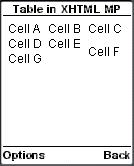
WAP CSS is required to control the presentation aspect of a table. For example, if you want to add a border to the table or specify the color of a table cell, you have to make use of WAP CSS. To let you see clearly the effect of the rowspan and colspan attributes in the previous XHTML MP example, we specify black borders to the table cells with the WAP CSS border property, like this:
td
{
border: thin solid black
}
|
|
|
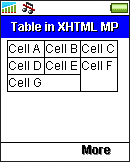
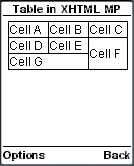
Have a look at the "WCSS Border Properties" section of our WAP CSS tutorial if you are interested in learning more about the border properties of WAP CSS. In addition, the "WCSS Color Properties" section includes an example that illustrates how to set the foreground color and background color of table cells.
| Previous Page | Page 22 of 36 | Next Page |  |
- 1. XHTML MP (XHTML Mobile Profile) Introduction
- 2. Development of Wireless Markup Languages
- 3. Advantages of XHTML MP
- 4. WML Features Lost in XHTML MP
- 5. Syntax Rules of XHTML MP
- 6. XHTML MP MIME Types and File Extension
- 7. XHTML MP Document Structure
- 8. XHTML MP Generic Metadata
- 9. Comments in XHTML MP
- 10. Line Breaking in XHTML MP
- 11. XHTML MP Horizontal Rules
- 12. XHTML MP Headings
- 13. Font Style in XHTML MP
- 14. XHTML MP Preformatted Text
- 15. XHTML MP Lists
- 16. XHTML MP Images
- 17. XHTML MP Tables
- 18. Anchor Links in XHTML MP
- 19. XHTML MP Selection Lists
- 20. XHTML MP Input Elements
- 21. Submitting Form Data to the Server in XHTML MP

