



21. Submitting Form Data to the Server in XHTML MP
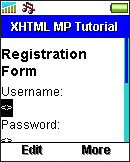
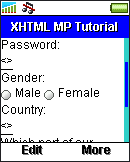
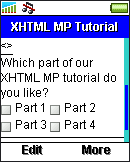
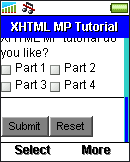
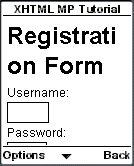
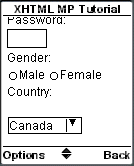
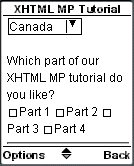
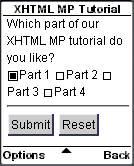
In the previous sections of this XHTML MP tutorial, we have mentioned about how to use selection lists and various input elements to obtain data from a user in XHTML MP. However, the user data has no use if it is not posted to the server for further processing. To post data to the server in XHTML MP, you need the <form></form> tags and a submit button. Let's first have a look at the following XHTML MP example. Then we will go into the details.
<?xml
version="1.0"?>
<!DOCTYPE html PUBLIC
"-//WAPFORUM//DTD XHTML Mobile 1.0//EN"
"http://www.wapforum.org/DTD/xhtml-mobile10.dtd">
<html
xmlns="http://www.w3.org/1999/xhtml">
<head>
<title>XHTML
MP Tutorial</title>
</head>
<body>
<h1>Registration
Form</h1>
<form method="get"
action="processing.asp">
<p>
Username:<br/>
<input
name="username"/><br/>
Password:<br/>
<input
type="password"
name="password"/><br/>
Gender:<br/>
<input
type="radio" name="gender"
value="m"/>Male
<input type="radio"
name="gender"
value="f"/>Female<br/>
Country:<br/>
<select
name="country">
<option
value="ca">Canada</option>
<option
value="cn">China</option>
<option
value="fr">France</option>
<option
value="de">Germany</option>
<option
value="in">India</option>
<option
value="it">Italy</option>
<option
value="jp">Japan</option>
<option
value="kr">Korea</option>
<option
value="uk">United Kingdom</option>
<option
value="us">United
States</option>
</select><br/>
Which
part of our XHTML MP tutorial do you like?<br/>
<input
type="checkbox" name="tutorial_part"
value="1"/>Part 1
<input type="checkbox"
name="tutorial_part" value="2"/>Part
2
<input type="checkbox" name="tutorial_part"
value="3"/>Part 3
<input type="checkbox"
name="tutorial_part" value="4"/>Part
4
<input type="hidden" name="temp_id"
value="123456"/>
</p>
<hr/>
<p>
<input
type="submit"/>
<input
type="reset"/>
</p>
</form>
</body>
</html>
|
|
|
| Previous Page | Page 33 of 36 | Next Page |  |
- 1. XHTML MP (XHTML Mobile Profile) Introduction
- 2. Development of Wireless Markup Languages
- 3. Advantages of XHTML MP
- 4. WML Features Lost in XHTML MP
- 5. Syntax Rules of XHTML MP
- 6. XHTML MP MIME Types and File Extension
- 7. XHTML MP Document Structure
- 8. XHTML MP Generic Metadata
- 9. Comments in XHTML MP
- 10. Line Breaking in XHTML MP
- 11. XHTML MP Horizontal Rules
- 12. XHTML MP Headings
- 13. Font Style in XHTML MP
- 14. XHTML MP Preformatted Text
- 15. XHTML MP Lists
- 16. XHTML MP Images
- 17. XHTML MP Tables
- 18. Anchor Links in XHTML MP
- 19. XHTML MP Selection Lists
- 20. XHTML MP Input Elements
- 21. Submitting Form Data to the Server in XHTML MP

