



16.2. Issues Concerning Large Images in XHTML MP
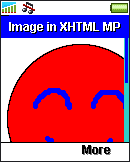
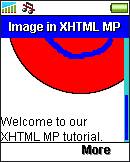
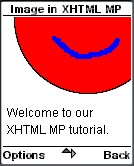
Many WAP browsers do not have horizontal scroll functionality. So, if the width of an image is larger than that of the wireless device's screen, many WAP browsers will crop off the image, which means your XHTML MP page may not look nice and professional to your users. The following example shows how an XHTML MP page with a large image will look on some mobile phone browsers:
<?xml
version="1.0"?>
<!DOCTYPE html PUBLIC
"-//WAPFORUM//DTD XHTML Mobile 1.0//EN"
"http://www.wapforum.org/DTD/xhtml-mobile10.dtd">
<html
xmlns="http://www.w3.org/1999/xhtml">
<head>
<title>Image
in XHTML MP</title>
</head>
<body>
<p>
<img
src="smileBig.gif" alt="Smile" height="159"
width="160" /><br/>
Welcome to our XHTML
MP tutorial.
</p>
</body>
</html>
|
|
|

Another issue that you have to concern is that the image size will affect your mobile Internet site's performance. Using the <img> tag's height and width attributes to scale down an image does not help improving the performance since the actual file size of the image is still the same.
Also, a larger image will cost more money for those who visit your mobile Internet site using GPRS, since cellular network operators charge their GPRS service subscribers by the amount of data transmitted through their cellular network.
It is essential to optimize the images in your XHTML MP pages so as to keep the image size small. There are several ways to do so:
Using an image manipulation program like GIMP and Photoshop to scale down the images, instead of sending a large image to the wireless device and reducing the image's rendering size with the height and width attributes of the <img> tag.
If the images are GIF files, you should use a small palette. A smaller palette can mean lower image quality, so you have to take a balance between the two.
If the images are JPG files, you should save them in a suitable compression ratio. A higher compression ratio will result in a smaller file size but a lower quality. So, you have to take a balance between the two.
Another way that can help improving the performance of your mobile Internet site is to use multipart messages. Normally when a user requests an XHTML MP page that contains images, the WAP browser first loads the XHTML MP document and then loads the images in separate requests. This means to load the whole XHTML MP page, several requests have to be made. Multipart messages allow you to place the XHTML MP document and the images in the same response, which means the whole XHTML MP page can be loaded with only one request. This minimizes the number of trips to the server. The details about how to construct a multipart message are out of the scope of this tutorial. You have to find other sources on the web if you are interested in it.
| Previous Page | Page 21 of 36 | Next Page |  |
- 1. XHTML MP (XHTML Mobile Profile) Introduction
- 2. Development of Wireless Markup Languages
- 3. Advantages of XHTML MP
- 4. WML Features Lost in XHTML MP
- 5. Syntax Rules of XHTML MP
- 6. XHTML MP MIME Types and File Extension
- 7. XHTML MP Document Structure
- 8. XHTML MP Generic Metadata
- 9. Comments in XHTML MP
- 10. Line Breaking in XHTML MP
- 11. XHTML MP Horizontal Rules
- 12. XHTML MP Headings
- 13. Font Style in XHTML MP
- 14. XHTML MP Preformatted Text
- 15. XHTML MP Lists
- 16. XHTML MP Images
- 17. XHTML MP Tables
- 18. Anchor Links in XHTML MP
- 19. XHTML MP Selection Lists
- 20. XHTML MP Input Elements
- 21. Submitting Form Data to the Server in XHTML MP

