



13. Font Style in XHTML MP
You can use tags to change the font style of the text in XHTML MP. However, some WAP browsers only support a subset of these tags, even though these tags are defined by the XHTML MP specification. This is because the WAP browser can only make use of the fonts available on the mobile device. For example, if the italic font is not available, the italic style is not supported. Unsupported XHTML MP tags will be ignored by WAP browsers and will not cause any errors.
<?xml
version="1.0"?>
<!DOCTYPE html PUBLIC
"-//WAPFORUM//DTD XHTML Mobile 1.0//EN"
"http://www.wapforum.org/DTD/xhtml-mobile10.dtd">
<html
xmlns="http://www.w3.org/1999/xhtml">
<head>
<title>Font
Style</title>
</head>
<body>
<p>
<b>Bold</b><br/>
<i>Italic</i><br/>
<b><i>Bold
italic</i></b><br/>
<small>Small</small><br/>
<big>Big</big><br/>
<em>Emphasis</em><br/>
<strong>Strong</strong>
</p>
</body>
</html>
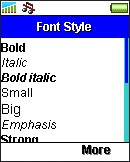
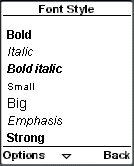
The <b> and <i> tags means bold and italic respectively. The <small> tag reduces the text size. The <big> tag increases the text size. The <em> and <strong> styles are similar. The WAP browser will display text with emphasis (<em>) or strong (<strong>) style in some way that makes it more noticeable. The effect depends on the actual wireless device.
The following screenshots show the output of the above XHTML MP markup code in some WAP browsers. The result will be somewhat different on other mobile phone models.
|
|
|
You can have more precise control over font formats with WAP CSS. For example, you can control the font family to be used or set a specific font size (e.g. 12pt) to some text.
The <u> tag of HTML does not exist in XHTML MP. So, if you want to underline some text, WAP CSS has to be used.
Font and text properties of WAP CSS are discussed in the "WCSS Font and Text Properties" section of our WAP CSS tutorial.
| Previous Page | Page 17 of 36 | Next Page |  |
- 1. XHTML MP (XHTML Mobile Profile) Introduction
- 2. Development of Wireless Markup Languages
- 3. Advantages of XHTML MP
- 4. WML Features Lost in XHTML MP
- 5. Syntax Rules of XHTML MP
- 6. XHTML MP MIME Types and File Extension
- 7. XHTML MP Document Structure
- 8. XHTML MP Generic Metadata
- 9. Comments in XHTML MP
- 10. Line Breaking in XHTML MP
- 11. XHTML MP Horizontal Rules
- 12. XHTML MP Headings
- 13. Font Style in XHTML MP
- 14. XHTML MP Preformatted Text
- 15. XHTML MP Lists
- 16. XHTML MP Images
- 17. XHTML MP Tables
- 18. Anchor Links in XHTML MP
- 19. XHTML MP Selection Lists
- 20. XHTML MP Input Elements
- 21. Submitting Form Data to the Server in XHTML MP

