



9. Comments in XHTML MP
Comments are placed inside <!-- --> in XHTML MP. This is the same as HTML and WML 1.x. For example, the following lines are comments. WAP browsers ignore all comments.
<!-- This is a comment in XHTML MP -->
<!--
This is a multi-line
comment -->
10. Line Breaking in XHTML MP
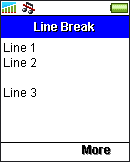
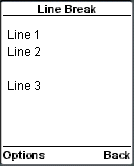
<br/> is the line breaking tag in XHTML MP, which is the same as that in HTML and WML 1.x. The following example demonstrates the usage of line breaks:
<?xml
version="1.0"?>
<!DOCTYPE html PUBLIC
"-//WAPFORUM//DTD XHTML Mobile 1.0//EN"
"http://www.wapforum.org/DTD/xhtml-mobile10.dtd">
<html
xmlns="http://www.w3.org/1999/xhtml">
<head>
<title>Line
Break</title>
</head>
<body>
<p>
Line
1<br/>
Line 2<br/><br/>
Line
3
</p>
</body>
</html>
The result should look like this in WAP browsers:
|
|
|
11. XHTML MP Horizontal Rules
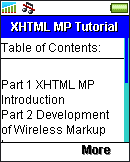
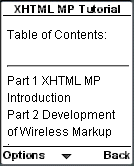
The <hr/> tag is used to add a horizontal rule to your XHTML MP page. Note that <hr/> should not be enclosed in the <p></p> tag pair.
The following example demonstrates the usage of horizontal rules in XHTML MP:
<?xml
version="1.0"?>
<!DOCTYPE html PUBLIC
"-//WAPFORUM//DTD XHTML Mobile 1.0//EN"
"http://www.wapforum.org/DTD/xhtml-mobile10.dtd">
<html
xmlns="http://www.w3.org/1999/xhtml">
<head>
<title>XHTML
MP Tutorial</title>
</head>
<body>
<p>
Table
of Contents:<br/>
</p>
<hr/>
<p>
Part
1 XHTML MP Introduction<br/>
Part 2 Development of
Wireless Markup Languages<br/>
Part 3 Advantages of
XHTML MP<br/>
Part 4 WML Features Lost in XHTML
MP
</p>
</body>
</html>
The following screenshots show the result of the above XHTML MP example in some mobile phone browsers:
|
|
|
| Previous Page | Page 15 of 36 | Next Page |  |
- 1. XHTML MP (XHTML Mobile Profile) Introduction
- 2. Development of Wireless Markup Languages
- 3. Advantages of XHTML MP
- 4. WML Features Lost in XHTML MP
- 5. Syntax Rules of XHTML MP
- 6. XHTML MP MIME Types and File Extension
- 7. XHTML MP Document Structure
- 8. XHTML MP Generic Metadata
- 9. Comments in XHTML MP
- 10. Line Breaking in XHTML MP
- 11. XHTML MP Horizontal Rules
- 12. XHTML MP Headings
- 13. Font Style in XHTML MP
- 14. XHTML MP Preformatted Text
- 15. XHTML MP Lists
- 16. XHTML MP Images
- 17. XHTML MP Tables
- 18. Anchor Links in XHTML MP
- 19. XHTML MP Selection Lists
- 20. XHTML MP Input Elements
- 21. Submitting Form Data to the Server in XHTML MP

