


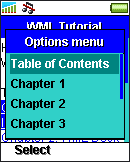
The following WML example illustrates how to use the <template> and <do> element to create a menu that is accessible in all cards of a deck:
<?xml
version="1.0"?>
<!DOCTYPE
wml PUBLIC "-//WAPFORUM//DTD WML 1.3//EN"
"http://www.wapforum.org/DTD/wml13.dtd">
<wml>
<template>
<do
name="menu_1" type="accept" label="Table of
Contents">
<go
href="#tutorial_tc"/>
</do>
<do
name="menu_2" type="accept" label="Chapter
1">
<go href="#tutorial_ch1"/>
</do>
<do
name="menu_3" type="accept" label="Chapter
2">
<go href="#tutorial_ch2"/>
</do>
<do
name="menu_4" type="accept" label="Chapter
3">
<go href="#tutorial_ch3"/>
</do>
<do
name="menu_5" type="accept" label="Chapter
4">
<go href="#tutorial_ch4"/>
</do>
<do
name="menu_6" type="accept" label="About
Us">
<go href="about_us.wml"/>
</do>
<do
name="menu_7" type="accept" label="Contact
Us">
<go
href="contact_us.wml"/>
</do>
</template>
<card
id="tutorial_tc" title="WML
Tutorial">
<p>
Hello, welcome to our
WML tutorial.<br/><br/>
Table of
Contents:<br/>
<anchor>
<go
href="#tutorial_ch1"/>
Chapter 1: WML
Introduction
</anchor><br/>
<anchor>
<go
href="#tutorial_ch2"/>
Chapter 2: WML Deck
and Card
</anchor><br/>
<anchor>
<go
href="#tutorial_ch3"/>
Chapter 3: WML
Document Structure
</anchor><br/>
<anchor>
<go
href="#tutorial_ch4"/>
Chapter 4: WML Generic
Metadata
</anchor><br/>
</p>
</card>
<card
id="tutorial_ch1" title="WML Tutorial
Ch1">
<p>
<em>Chapter 1: WML
Introduction</em><br/><br/>
...
</p>
</card>
<card
id="tutorial_ch2" title="WML Tutorial
Ch2">
<p>
<em>Chapter 2: WML Deck
and Card</em><br/><br/>
...
</p>
</card>
<card
id="tutorial_ch3" title="WML Tutorial
Ch3">
<p>
<em>Chapter 3: WML
Document
Structure</em><br/><br/>
...
</p>
</card>
<card
id="tutorial_ch4" title="WML Tutorial
Ch4">
<p>
<em>Chapter 4: WML
Generic Metadata</em><br/><br/>
...
</p>
</card>
</wml>
Open the above WML example in a WAP browser and you should see something like this:
|
|
|
|
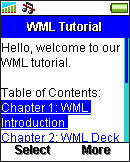
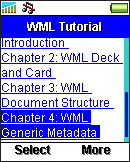
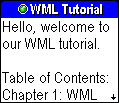
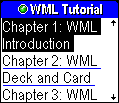
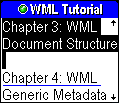
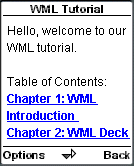
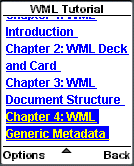
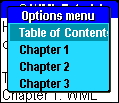
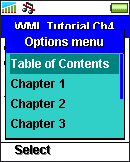
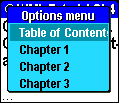
Press the "More" softkey of the Sony Ericsson T610 mobile phone browser, the "Options menu" button of the Sony Ericsson T68i mobile phone and the "Options" softkey of Nokia Mobile Browser 4 to bring up the menu:
|
|
|
|
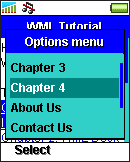
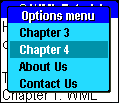
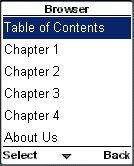
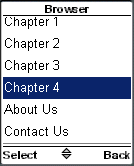
Select the "Chapter 4" item of the menu. The following cards then appear:
|
|
|
|
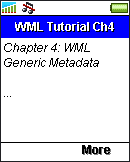
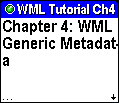
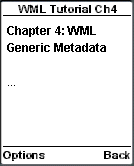
To navigate to another card, bring up the menu again and select another item:
|
|
|
|
| Previous Page | Page 26 of 50 | Next Page |  |
- 1. WML (Wireless Markup Language) Introduction
- 2. WML Deck and Card
- 3. WML Document Structure
- 4. WML Generic Metadata: <meta>
- 5. Comments in WML
- 6. Line Breaking in WML
- 7. Font Size and Style in WML
- 8. WML Preformatted Text: <pre>
- 9. WML Images
- 10. WML Tables
- 11. WML Anchor Links
- 12. Programming Softkeys of Mobile Phones and the <do> Element
- 13. WML Template and Menu
- 14. WML Events and the <onevent> Tag
- 15. Timer and the ontimer Event
- 16. WML Event: onenterbackward
- 17. WML Event: onenterforward
- 18. WML Selection Lists and the onpick Event
- 19. WML Input Fields
- 20. WML Variables
- 21. Submitting Form Data to the Server in WML
- 22. Clearing a Saved Form in WML

