



7. Font Size and Style in WML
WML includes a number of tags that can be used to change the font size and style of the text. However, some older WAP browsers do not support these tags or only support a subset of these tags, even though these tags are defined by the WML specification. Unsupported WML tags will be ignored by WAP browsers but will not cause any errors.
Let's first have a look at the following WML example. We will then describe the font size and font style tags one by one.
<?xml
version="1.0"?>
<!DOCTYPE wml PUBLIC
"-//WAPFORUM//DTD WML 1.3//EN"
"http://www.wapforum.org/DTD/wml13.dtd">
<wml>
<card
id="card1" title="Font
Style">
<p>
<b>Bold</b><br/>
<i>Italic</i><br/>
<u>Underline</u><br/>
<small>Small</small><br/>
<big>Big</big><br/>
<em>Emphasis</em><br/>
<strong>Strong</strong>
</p>
</card>
</wml>
The <b>, <i> and <u> tags mean bold, italic and underline respectively.
The <small> and <big> tags are used to reduce and increase the text size respectively.
The emphasis (<em>) and strong emphasis (<strong>) styles are similar. A WAP browser will display text with the emphasis or strong emphasis style in some way that makes it more noticeable. The actual effect depends on the mobile device.
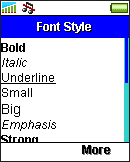
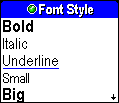
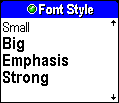
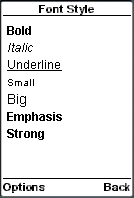
The following screenshots show you the effect of the above font size and font style tags in some mobile phone browsers. The result will be somewhat different in other mobile phone models.
|
|
|
|
| Previous Page | Page 10 of 50 | Next Page |  |
- 1. WML (Wireless Markup Language) Introduction
- 2. WML Deck and Card
- 3. WML Document Structure
- 4. WML Generic Metadata: <meta>
- 5. Comments in WML
- 6. Line Breaking in WML
- 7. Font Size and Style in WML
- 8. WML Preformatted Text: <pre>
- 9. WML Images
- 10. WML Tables
- 11. WML Anchor Links
- 12. Programming Softkeys of Mobile Phones and the <do> Element
- 13. WML Template and Menu
- 14. WML Events and the <onevent> Tag
- 15. Timer and the ontimer Event
- 16. WML Event: onenterbackward
- 17. WML Event: onenterforward
- 18. WML Selection Lists and the onpick Event
- 19. WML Input Fields
- 20. WML Variables
- 21. Submitting Form Data to the Server in WML
- 22. Clearing a Saved Form in WML

