



8. WML Preformatted Text: <pre>
The <pre> tag is used to specify preformatted text in WML. Preformatted text is text of which the format follows the way it is typed in the WML document.
In WML, leading and trailing whitespaces (i.e. spaces, tabs and newlines) of a paragraph are not displayed. Furthermore, two or more whitespaces in a paragraph are shown as one whitespace on the screen of mobile devices. Such behavior is demonstrated in the following WML example.
<?xml
version="1.0"?>
<!DOCTYPE wml PUBLIC
"-//WAPFORUM//DTD WML 1.3//EN"
"http://www.wapforum.org/DTD/wml13.dtd">
<wml>
<card
id="card1" title="WML Tutorial">
<p>
Hello, welcome
to
our
WML tutorial
.</p>
</card>
</wml>
|
|
|
|
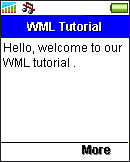
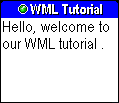
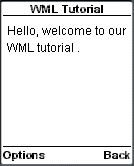
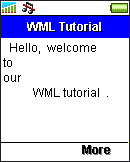
To preserve the formatting of the text, you have to use the <pre> element. WAP browsers treat the content enclosed in the <pre></pre> tag pair as preformatted and whitespaces are left intact.
The following WML example illustrates how to use the <pre> element:
<?xml
version="1.0"?>
<!DOCTYPE wml PUBLIC
"-//WAPFORUM//DTD WML 1.3//EN"
"http://www.wapforum.org/DTD/wml13.dtd">
<wml>
<card
id="card1" title="WML Tutorial">
<pre>
Hello, welcome
to
our
WML tutorial
.</pre>
</card>
</wml>
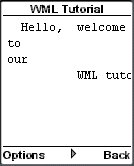
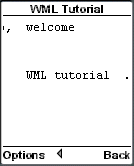
The result of the above WML example in WAP browsers is shown below (the screenshot for Sony Ericsson T68i is not shown since the <pre> element does not work in the emulator):
|
|
|
| Previous Page | Page 11 of 50 | Next Page |  |
- 1. WML (Wireless Markup Language) Introduction
- 2. WML Deck and Card
- 3. WML Document Structure
- 4. WML Generic Metadata: <meta>
- 5. Comments in WML
- 6. Line Breaking in WML
- 7. Font Size and Style in WML
- 8. WML Preformatted Text: <pre>
- 9. WML Images
- 10. WML Tables
- 11. WML Anchor Links
- 12. Programming Softkeys of Mobile Phones and the <do> Element
- 13. WML Template and Menu
- 14. WML Events and the <onevent> Tag
- 15. Timer and the ontimer Event
- 16. WML Event: onenterbackward
- 17. WML Event: onenterforward
- 18. WML Selection Lists and the onpick Event
- 19. WML Input Fields
- 20. WML Variables
- 21. Submitting Form Data to the Server in WML
- 22. Clearing a Saved Form in WML

