



16.3. Displaying Input Fields and Getting Data from Users: prompt() Function
The prompt() function can help you get data from users. When the WMLScript interpreter encounters the prompt() function, it instructs the WAP browser to display an input field. The text entered by the user will be returned from the function. This is the syntax of prompt():
Dialogs.prompt(title, default_text);
title and default_text are the title and the default value of the input field respectively. If everything works fine, prompt() returns the text entered by the user, otherwise it returns invalid indicating an error has occurred.
The WML/WMLScript example below illustrates the usage of the prompt() function. The user will be asked to enter a number in the range 1-100. If it is outside the range, we will ask the user to enter another number.
<?xml
version="1.0"?>
<!DOCTYPE wml PUBLIC
"-//WAPFORUM//DTD WML 1.3//EN"
"http://www.wapforum.org/DTD/wml13.dtd">
<wml>
<card
id="card1" title="prompt()
Example">
<p>
Enter a number between
1-100:<br/>
<input
name="number"/><br/><br/>
<a
href="promptEg1.wmls#checkRange($(number))">Continue</a>
</p>
</card>
<card
id="card2" title="prompt() Example">
<p>
The
number you entered is $(number).
</p>
</card>
</wml>
extern
function checkRange(number)
{
while (number < 1 || number
> 100){
number = Dialogs.prompt("The number is not
between 1-100. Please enter again.", number);
number
= Lang.parseInt(number);
}
WMLBrowser.setVar("number",
number);
WMLBrowser.go("#card2");
}
The parseInt() function in the above script is a new function to you. It is used to convert a string value to an integer. We will look at it in detail when we cover the Lang standard library.
The following screenshots show the result of the above WML/WMLScript example in some mobile phone browsers:
|
|
|
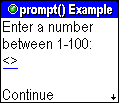
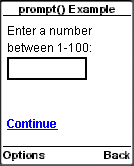
If you type 1000 in the input field and select the "Continue" anchor link, the mobile phone browser will prompt you for another number:
|
|
|
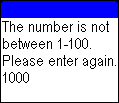
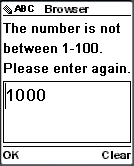
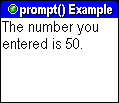
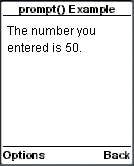
Enter 50 in the input field. The mobile phone browser will go to the WML card with the ID "card2":
|
|
|
| Previous Page | Page 39 of 71 | Next Page |  |
- 1. WMLScript Introduction
- 2. Hello World WMLScript Example
- 3. Compiling WMLScript Code
- 4. WMLScript Language Rules
- 5. Defining WMLScript Functions
- 6. Calling WMLScript Functions
- 7. WMLScript Variables
- 8. WMLScript Data Types
- 9. WMLScript Variables Vs WML Variables
- 10. Passing Arguments to Functions By Value and By Reference
- 11. WMLScript Operators
- 12. WMLScript Conditional Statements
- 13. WMLScript Looping Statements
- 14. WMLScript Standard Libraries Overview
- 15. WMLScript WMLBrowser Standard Library
- 16. WMLScript Dialogs Standard Library
- 17. WMLScript String Standard Library
- 18. WMLScript Float Standard Library
- 19. WMLScript Lang Standard Library
- 20. WMLScript URL Standard Library
- 21. WMLScript Example: Validating Form Data

