



2. Hello World WMLScript Example
An effective way to learn a new language is to go through examples. The following "Hello World" WMLScript example shows you how a WMLScript file typically looks like and demonstrates how to call WMLScript code in a WML document.
<?xml
version="1.0"?>
<!DOCTYPE wml PUBLIC
"-//WAPFORUM//DTD WML 1.3//EN"
"http://www.wapforum.org/DTD/wml13.dtd">
<wml>
<card
id="card1" title="WMLScript
Tutorial">
<p>
<a
href="helloWorldEg1.wmls#helloWorld()">Run
WMLScript</a><br/>
$(message)
</p>
</card>
</wml>
Here is the file that contains the WMLScript code:
extern
function helloWorld()
{
WMLBrowser.setVar("message",
"Hello World. Welcome to our WMLScript
tutorial.");
WMLBrowser.refresh();
}
Open the helloWorldEg1.wml file in a mobile phone browser and you can see something like this:
|
|
|
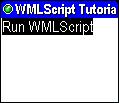
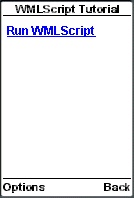
If you select the "Run WMLScript" link, the WMLScript function helloWorld() is executed and the line "Hello World. Welcome to our WMLScript tutorial." will appear in the mobile phone browser.
|
|
|
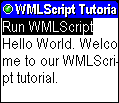
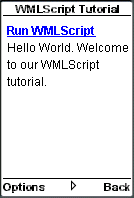
In the above example, the WMLScript code is not embedded in the WML markup and they are kept in separate files. This is the rule of WMLScript and you need to follow this when programming mobile Internet browsing applications.
There is only one function, helloWorld(), in the WMLScript file. The extern keyword is used to specify that the helloWorld() function is allowed to be called from outside the WMLScript file helloWorldEg1.wmls. The extern keyword is necessary here since we want to call the function from the WML file helloWorldEg1.wml.
Inside the helloWorld() function, we use two functions of the WMLBrowser standard library, setVar() and refresh(). The setVar() function is used to assign a value to a WML variable. We use the WMLScript code:
WMLBrowser.setVar("message", "Hello World. Welcome to our WMLScript tutorial.");
to assign the value "Hello World. Welcome to our WMLScript tutorial." to a WML variable named message.
The refresh() function is used to instruct the WAP browser to refresh the current WML card. In the helloWorld() function, after we have assigned a value to the message variable, we make use of the line:
WMLBrowser.refresh();
to refresh the WML card so that the change made to the message variable is shown on the screen of the mobile device.
To call the WMLScript function helloWorld() in the WML document, we use the URL below:
helloWorldEg1.wmls#helloWorld()
helloWorldEg1.wmls is the file that contains the WMLScript code and helloWorld() is the function to call.
| Previous Page | Page 2 of 71 | Next Page |  |
- 1. WMLScript Introduction
- 2. Hello World WMLScript Example
- 3. Compiling WMLScript Code
- 4. WMLScript Language Rules
- 5. Defining WMLScript Functions
- 6. Calling WMLScript Functions
- 7. WMLScript Variables
- 8. WMLScript Data Types
- 9. WMLScript Variables Vs WML Variables
- 10. Passing Arguments to Functions By Value and By Reference
- 11. WMLScript Operators
- 12. WMLScript Conditional Statements
- 13. WMLScript Looping Statements
- 14. WMLScript Standard Libraries Overview
- 15. WMLScript WMLBrowser Standard Library
- 16. WMLScript Dialogs Standard Library
- 17. WMLScript String Standard Library
- 18. WMLScript Float Standard Library
- 19. WMLScript Lang Standard Library
- 20. WMLScript URL Standard Library
- 21. WMLScript Example: Validating Form Data

