



20.3. How to Match WCSS Cascading Style Sheets to Different User Agents?
Before we talk about how to match WCSS cascading style sheets to different user agents, let's go back to the request-response cycle between a server and a client browser that we mentioned earlier. We copy and paste it here for your convenience.
The WAP browser requests an XHTML MP page from the server.
The server receives the request and delivers the XHTML MP document to the WAP browser.
The WAP browser receives the XHTML MP document and finds that it contains a <link> tag that references to an external cascading style sheet.
The WAP browser sends another request to the server in order to obtain the WAP CSS cascading style sheet.
The server receives the request and delivers the WAP CSS cascading style sheet to the WAP browser.
The WAP browser receives the WAP CSS file and displays the XHTML MP page according to the style information contained in the WAP CSS file.
The steps repeat when the user selects an anchor link or types a new URL in the WAP browser.
As you can see from above, the server receives a HTTP request at step 2 and step 5. This means to match the appropriate WCSS cascading style sheet to a client browser, you can either:
(Way 1) Detect the user agent at step 2. Then according to the user-agent header value, change the URL to the WCSS cascading style sheet (the URL is contained in the href attribute of the <link> tag) in the XHTML MP document
Or
(Way 2) Detect the user agent at step 5. Then according to the user-agent header value, change the contents of the WCSS cascading style sheet
Let's see an XHTML MP/WCSS example that can help you understand how to use JSP and the user-agent header to match cascading style sheets to different user agents.
In this XHTML MP/WCSS example, we define three cascading style sheets. The first one is for Nokia's mobile phone browsers, the next one is for Sony Ericsson's mobile phone browsers and the last one is for desktop web browsers.
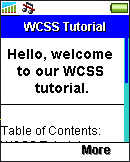
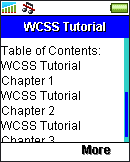
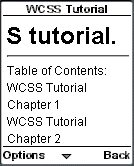
Below is the WAP CSS style sheet for Nokia's mobile phone browsers. It specifies that level-1 headings should be displayed with the marquee effect. (In case you forget how to use the marquee extension, you can go back to "WCSS Marquee Extension" and have a look.)
h1
{
display: -wap-marquee;
-wap-marquee-loop: infinite
}
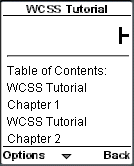
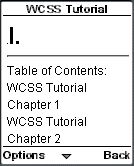
Here is the WAP CSS style sheet for Sony Ericsson's mobile phone browsers. It specifies that level-1 headings should be displayed in bold type and aligned to the center horizontally.
h1
{
font-weight: bold;
text-align: center
}
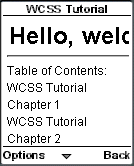
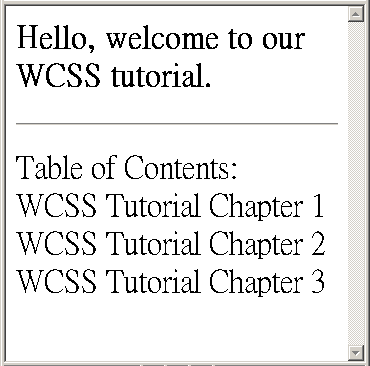
Here is the WAP CSS style sheet for desktop web browsers. As desktop computers have large screens, we want the text to be displayed in extra large size.
body
{
font-size: x-large
}
Below is the JSP file that contains the XHTML MP markup. The JSP code demonstrates how to match WCSS cascading style sheets to different client browsers using Way 1 (detecting the user agent when the XHTML MP document is requested).
<?xml
version="1.0"?>
<!DOCTYPE html PUBLIC
"-//WAPFORUM//DTD XHTML Mobile 1.0//EN"
"http://www.wapforum.org/DTD/xhtml-mobile10.dtd">
<html
xmlns="http://www.w3.org/1999/xhtml">
<head>
<%
String
uaheader = request.getHeader("user-agent");
if
(uaheader.indexOf("Nokia") != -1){
%>
<link
href="nokia.css" rel="stylesheet"
type="text/css"/>
<%
}
else if
(uaheader.indexOf("SonyEricsson") != -1){
%>
<link
href="sonyericsson.css" rel="stylesheet"
type="text/css"/>
<%
}
else if
(uaheader.indexOf("Mozilla") != -1){
%>
<link
href="webbrowser.css" rel="stylesheet"
type="text/css"/>
<%
}
%>
<title>WCSS
Tutorial</title>
</head>
<body>
<h1>Hello,
welcome to our WCSS tutorial.</h1>
<hr/>
<p>
Table
of Contents:<br/>
WCSS Tutorial Chapter
1<br/>
WCSS Tutorial Chapter 2<br/>
WCSS
Tutorial Chapter 3<br/>
</p>
</body>
</html>
What the JSP code does is very simple. Here are some descriptions:
1. The user-agent HTTP header value is obtained and is assigned to the variable uaheader.
String uaheader = request.getHeader("user-agent");
2. The variable uaheader is checked to see if it contains the words "Nokia", "SonyEricsson" or "Mozilla". The indexOf(String str) method of the String object returns the index of the first occurrence of the str substring. If str is not found, -1 is returned by the indexOf(String str) method. In other words, if str is found, the return value will not be -1.
If the variable uaheader contains "Nokia", it means the user agent is a Nokia mobile phone browser and we change the URL of the external cascading style sheet to nokia.css.
<%
if
(uaheader.indexOf("Nokia") != -1){
%>
<link
href="nokia.css" rel="stylesheet"
type="text/css"/>
<%
}
Otherwise if the variable uaheader contains "SonyEricsson", it means the user agent is a Sony Ericsson mobile phone browser and we change the URL of the external cascading style sheet to sonyericsson.css.
else
if (uaheader.indexOf("SonyEricsson") != -1){
%>
<link
href="sonyericsson.css" rel="stylesheet"
type="text/css"/>
<%
}
Otherwise if the variable uaheader contains "Mozilla", it means the user agent is a desktop web browser (like IE, Firefox and Mozilla) and we change the URL of the external cascading style sheet to webbrowser.css.
else
if (uaheader.indexOf("Mozilla") != -1){
%>
<link
href="webbrowser.css" rel="stylesheet"
type="text/css"/>
<%
}
%>
Note that we have to check for the word "Mozilla" in the last "else if" statement since the user-agent header value of some mobile phone browsers contains the word "Mozilla". For example, let's say the user-agent header value of a certain Nokia mobile phone browser contains that word "Mozilla". If we check for the word "Mozilla" in the first "if" statement, the JSP code will wrongly identify the Nokia mobile phone browser as a desktop web browser.
Now let's move on to another example that demonstrates how to match WCSS cascading style sheets to different client browsers using Way 2 (detecting the user agent when the cascading style sheet is requested). This example produces the same result as our first example.
<?xml
version="1.0"?>
<!DOCTYPE html PUBLIC
"-//WAPFORUM//DTD XHTML Mobile 1.0//EN"
"http://www.wapforum.org/DTD/xhtml-mobile10.dtd">
<html
xmlns="http://www.w3.org/1999/xhtml">
<head>
<link
href="diffUserAgentEg2CSS.jsp" rel="stylesheet"
type="text/css"/>
<title>WCSS
Tutorial</title>
</head>
<body>
<h1>Hello,
welcome to our WCSS tutorial.</h1>
<hr/>
<p>
Table
of Contents:<br/>
WCSS Tutorial Chapter
1<br/>
WCSS Tutorial Chapter 2<br/>
WCSS
Tutorial Chapter 3<br/>
</p>
</body>
</html>
This JSP file is the WAP CSS style sheet:
<%
response.setContentType("text/css");
String
uaheader = request.getHeader("user-agent");
if
(uaheader.indexOf("Nokia") != -1){
%>
<%@
include file="nokia.css" %>
<%
}
else if
(uaheader.indexOf("SonyEricsson") != -1){
%>
<%@
include file="sonyericsson.css" %>
<%
}
else
if (uaheader.indexOf("Mozilla") != -1){
%>
<%@
include file="webbrowser.css" %>
<%
}
%>
What the above JSP code does is very similar to our first example. Here are some descriptions:
1. The MIME type of the document is set to text/css. It informs the client browser that this JSP file is a WAP CSS cascading style sheet.
response.setContentType("text/css");
2. The user-agent HTTP header is obtained and is assigned to the variable uaheader.
String uaheader = request.getHeader("user-agent");
3. The variable uaheader is checked to see if it contains the words "Nokia", "SonyEricsson" or "Mozilla".
If the variable uaheader contains "Nokia", it means the user agent is a Nokia mobile phone browser and we add the contents of the file nokia.css into the cascading style sheet.
if
(uaheader.indexOf("Nokia") != -1){
%>
<%@
include file="nokia.css" %>
<%
}
Otherwise if the variable uaheader contains "SonyEricsson", it means the user agent is a Sony Ericsson mobile phone browser and we add the contents of the file sonyericsson.css into the cascading style sheet.
else
if (uaheader.indexOf("SonyEricsson") != -1){
%>
<%@
include file="sonyericsson.css" %>
<%
}
Otherwise if the variable uaheader contains "Mozilla", it means the user agent is a desktop web browser (like IE, Firefox and Mozilla) and we add the contents of the file webbrowser.css into the cascading style sheet.
else
if (uaheader.indexOf("Mozilla") != -1){
%>
<%@
include file="webbrowser.css" %>
<%
}
%>
Below shows the result of the above example in Nokia Mobile Browser 4.0, Sony Ericsson T610 and Microsoft Internet Explorer respectively:
|
|
|
|
|
| Previous Page | Page 39 of 39 |  |
- 1. WCSS (WAP CSS) Introduction
- 2. Wireless CSS and Wireless Profile CSS
- 3. Advantages of Using WAP CSS Style Sheets on Mobile Internet Sites
- 4. Disadvantages of Using WAP CSS Style Sheets on Mobile Internet Sites
- 5. Syntax Rules of WCSS
- 6. Comments in WCSS
- 7. How to Apply WCSS Styles to an XHTML MP Document
- 8. Different Types of Selectors
- 9. Div and Span Element of XHTML MP
- 10. Cascading Rules for Handling Multiple Groups of WCSS Styles Applied to the Same Element
- 11. Common Types of Property Value
- 12. WCSS Font and Text Properties
- 13. WCSS List Properties
- 14. WCSS Color Properties
- 15. WCSS Border Properties
- 16. WAP Specific Extensions to CSS
- 17. WCSS Access Key Extension
- 18. WCSS Input Extension
- 19. WCSS Marquee Extension
- 20. Matching WCSS Cascading Style Sheets to Different User Agents

